 DriveHub
SUPPORT / HOW TO
Prepare a Finnish sole trader’s car records for year end
Keep a complete annual log, check the private or business-asset treatment and give the bookkeeper the figures for the correct accounting year.
Updated
← All support answers01 / 04
Choose the business treatment and accounting period
In Settings → Your work situation choose the self-employed answer for a private car when that is your actual treatment. In Settings → Your car → your vehicle set Finland and the actual vehicle class. For a car held as a business asset, use the business-asset treatment and check Held as a business asset on the vehicle.
Open Settings → Your work situation → Your accounts start and set the actual accounting-year start. Check the displayed Accounting year (tilikausi), not just the selected month. A July–June year uses a different reporting window and rate year from a calendar year; the Form 5 card names both.
A sole trader’s additional deduction is a tax-return figure. An employee of their own Oy follows the company-payment journey instead.
- Confirm with the bookkeeper whether the car is private or held as a business asset.
- Set the accounting-year start and enter opening odometer evidence.
- Use manual entry for notebook-based driving if automatic tracking is not part of your workflow.
02 / 04
Keep the whole year’s denominator complete
Record business, commute and private driving throughout the accounting year. Add the business purpose and check each vehicle assignment. Enter actual dated odometer readings at the accounting-year boundaries; an October pair does not establish a complete year's mileage.
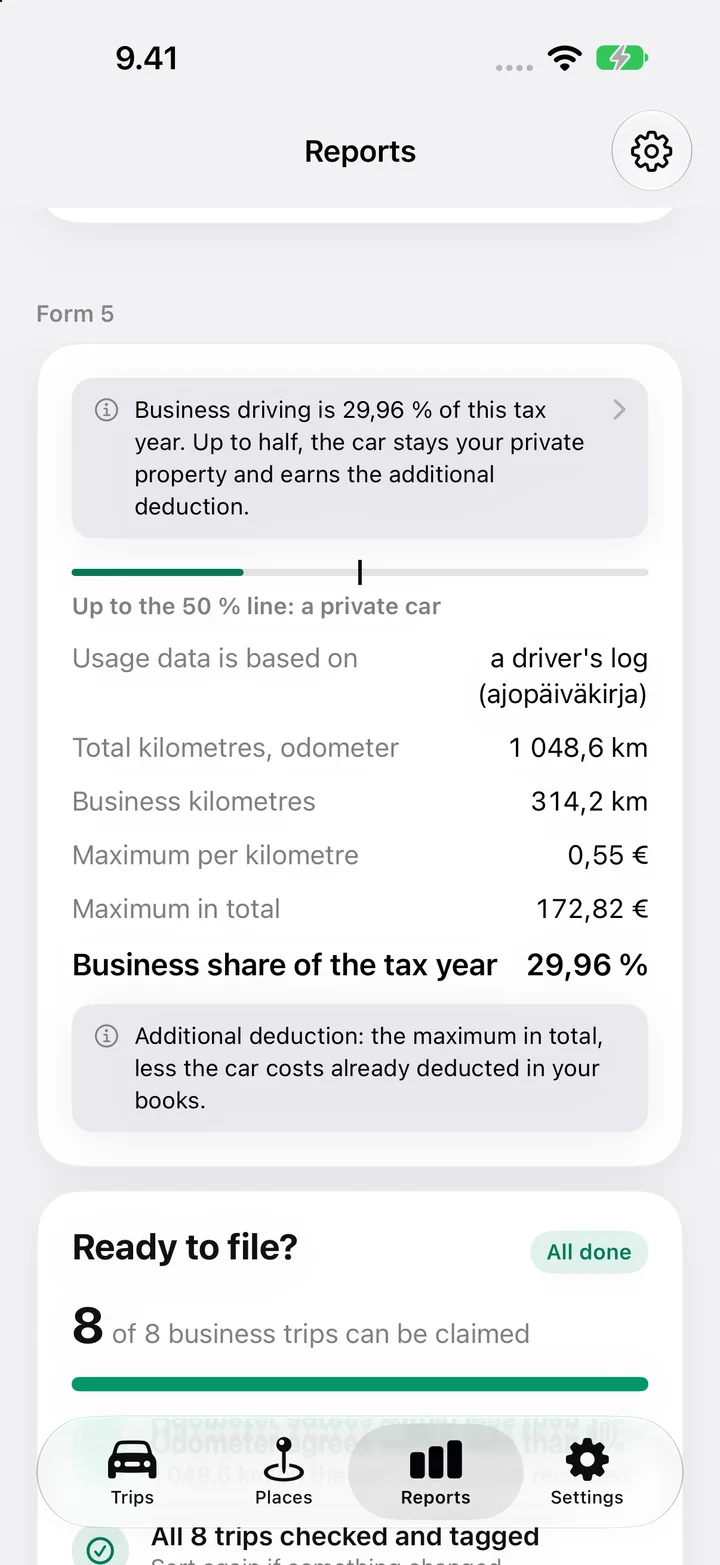
In Reports choose the vehicle and inspect Form 5. Check business, private and total kilometres and the business-share marker. Review an odometer gap and missing trips before relying on the share. The card’s 50 % marker identifies when the private-car method no longer matches the app’s annual test; ask the bookkeeper about a change in treatment before producing the final package.
- Review the month’s trips and complete missing purposes.
- Compare trips with the odometer over the same vehicle and period.
- Clear any employer filter when looking for the Form 5 card.
- At year end select dates matching the full tilikausi and recheck the share.
03 / 04
Hand over the private-car deduction inputs
Read Form 5, part 10 for the selected accounting year. Give the bookkeeper total kilometres, business kilometres, business share, the maximum shown and car costs already deducted in the books. The additional deduction is the applicable maximum less those already deducted costs; the mileage maximum alone is not the final return entry.
The private-car card explains the subtraction but does not store the bookkeeper's actual booked costs as a complete accounting record. Supply those costs separately. Do not export the additional deduction as a cash reimbursement voucher or describe it as tax saved.
- Check the accounting-year dates and the year of the kilometre figure on the card.
- Export the year’s PDF or Excel and attach the actual costs already deducted.
- Ask the bookkeeper to reconcile the return figure with those costs before filing.
04 / 04
Separate business-asset, VAT and farming evidence
For a business-asset vehicle, check Form 5, part 6: business, private and total kilometres and the private share. The card lets you enter Car costs for the year, with depreciation to inspect the private-cost figure. That entry is not stored; retain the actual cost schedule with the report.
Read the VAT explanation for the actual vehicle class. A van's kilometre split and a passenger-car VAT restriction are different outcomes; a high business share is not by itself permission to claim a passenger car’s input VAT. Give invoices and use evidence to the bookkeeper separately.
DriveHub does not prepare the farmer’s Form 2 calculation. Keep a complete farm-purpose log and annual odometer evidence, export those records and agree the farm-return treatment with the bookkeeper. Do not present the app's Form 5 card as a completed Form 2 calculation.
- For a business asset, export the kilometre split and retain the year’s actual costs.
- For a van, identify the vehicle class and supply the VAT-use evidence requested by the bookkeeper.
- For farm records, label the handoff as supporting evidence for the farm return.